

Curate Adapters (Vaults V2)
Adapters are the core of a Morpho Vault V2's extensibility. They are smart contracts that act as bridges, allowing your vault to connect to and allocate assets in any version of the Morpho protocol. As a Curator, enabling and managing adapters is how you define your vault's investment universe.
This guide will walk you through the process of deploying, listing, and managing adapters, with a focus on two key adapters:
MorphoMarketV1AdapterV2: Connects your Morpho Vault V2 directly to Morpho V1 markets.MorphoVaultV1Adapter: Connects your Morpho Vault V2 to a Morpho Vault V1.
Setting Up Your First Adapter: The MorphoMarketV1AdapterV2
The MorphoMarketV1AdapterV2 allows your Morpho Vault V2 to allocate directly to Morpho Markets V1. It is deployed via the MorphoMarketV1AdapterV2Factory, which takes the parent vault address and automatically connects to the Morpho V1 contract.
Method 1: via the Curator App V2 (Recommended)
On your Morpho Vault V2 page, click on the Adapters tab. If none setup yet, the interface will propose a flow to set an adapter.
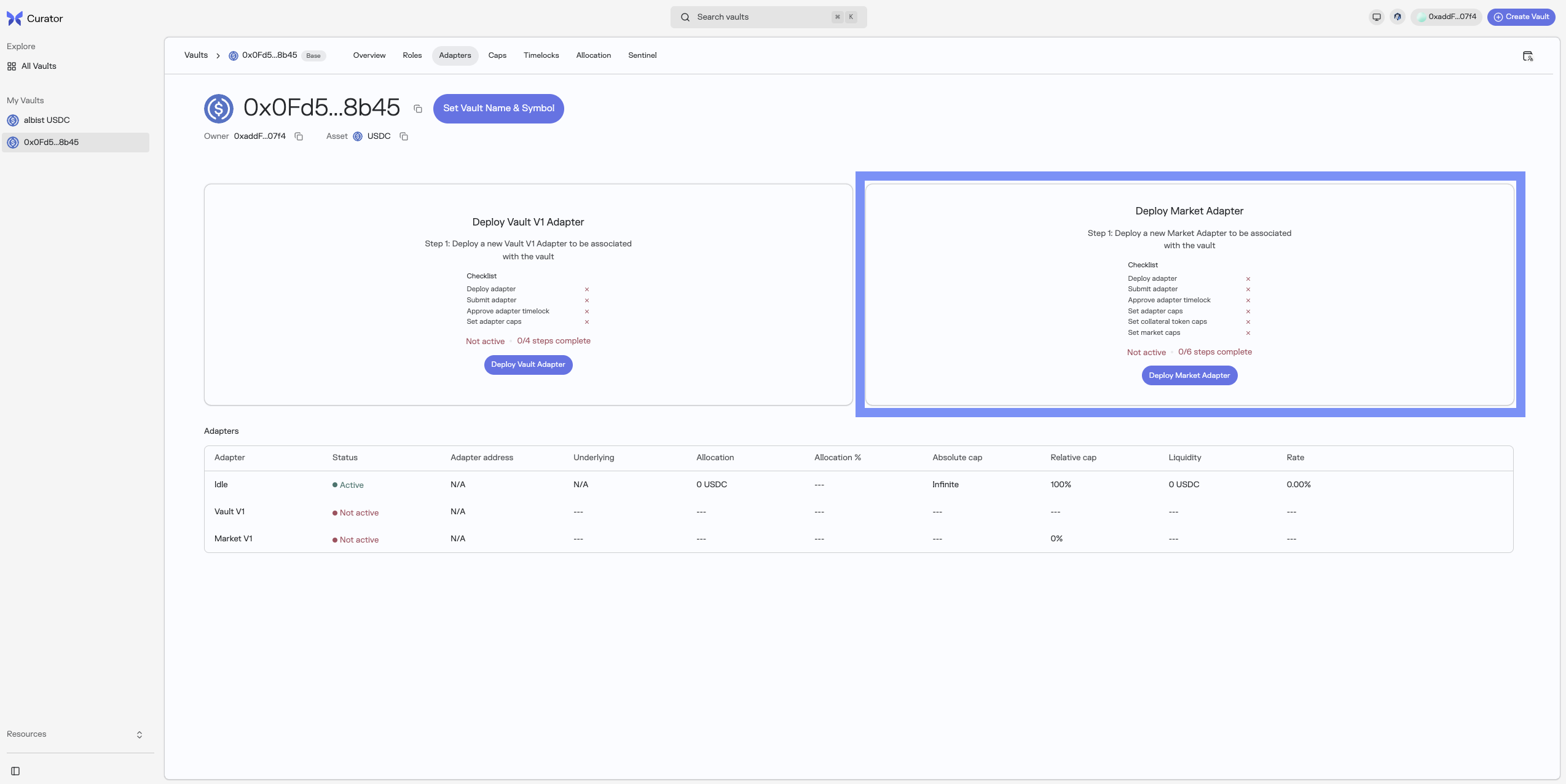
The flow will implement the steps below:
- Deploy adapter
- Submit adapter
- Approve adapter timelock
- Set adapter caps
- Set collateral token caps
- Set market caps
1. Review and deploy the MorphoMarketV1AdapterV2
2. Once deployed, you can refer to the flow presented on the Submit Market Adapter frame and Submit Adapter.

3. Once submitted and potential timelock has passed, reclick on the flow to actually add the Adapter.
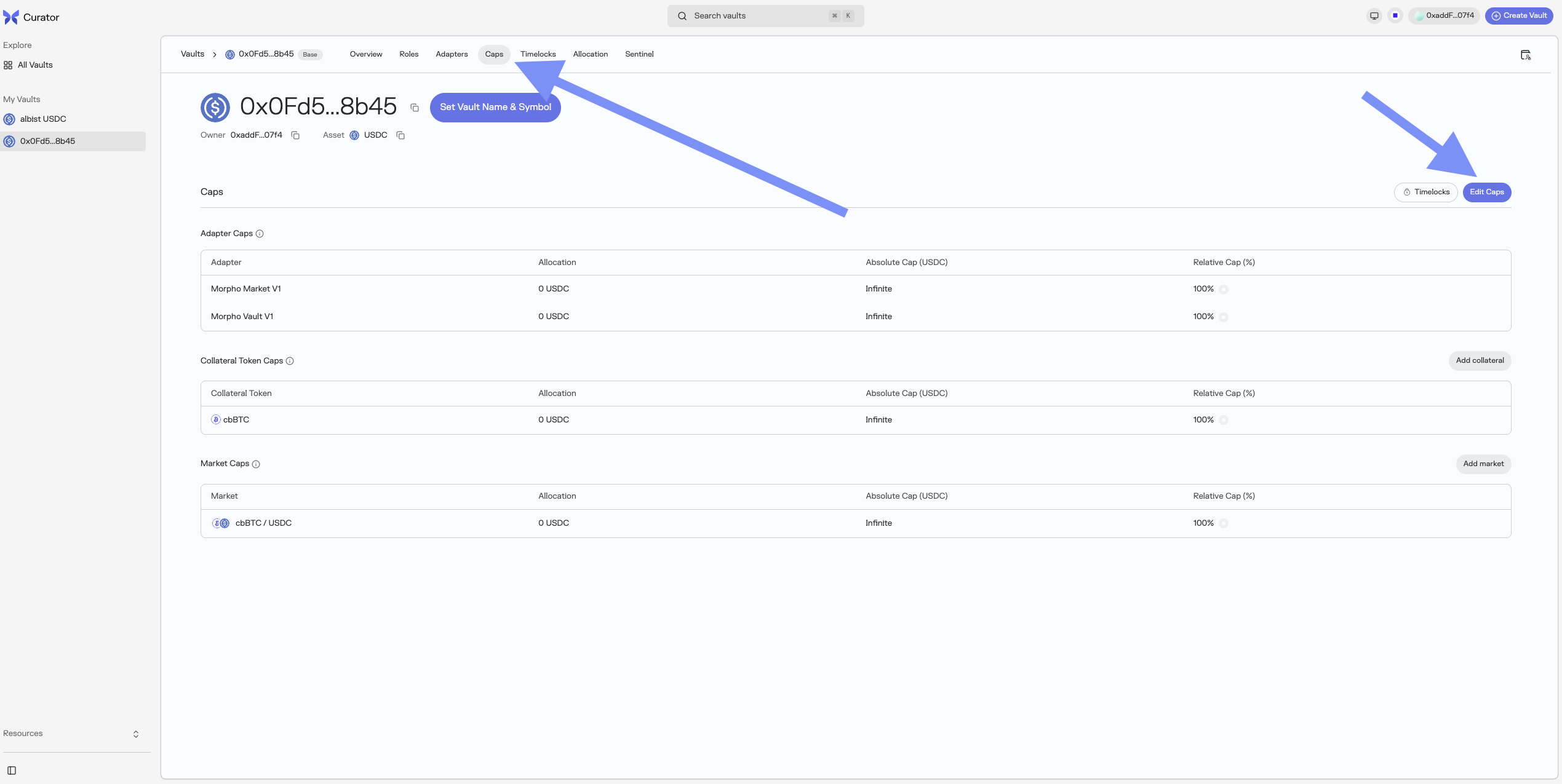
4. To finalize the Adapter setup, head over the Caps tab, and set the following caps:
- Adapter Caps: via the "Edit Caps" button, set the Absolute (in loan asset) and Relative (in % of vault allocation) caps for the Adapter you just deployed and set to your Morpho Vault V2.
- Collateral Token Caps: via the "Add collateral" button specify a collateral asset address and the related Absolute and Relative Caps.
- Market Caps: via the "Add market" button specify a market ID and the related Absolute and Relative Caps.
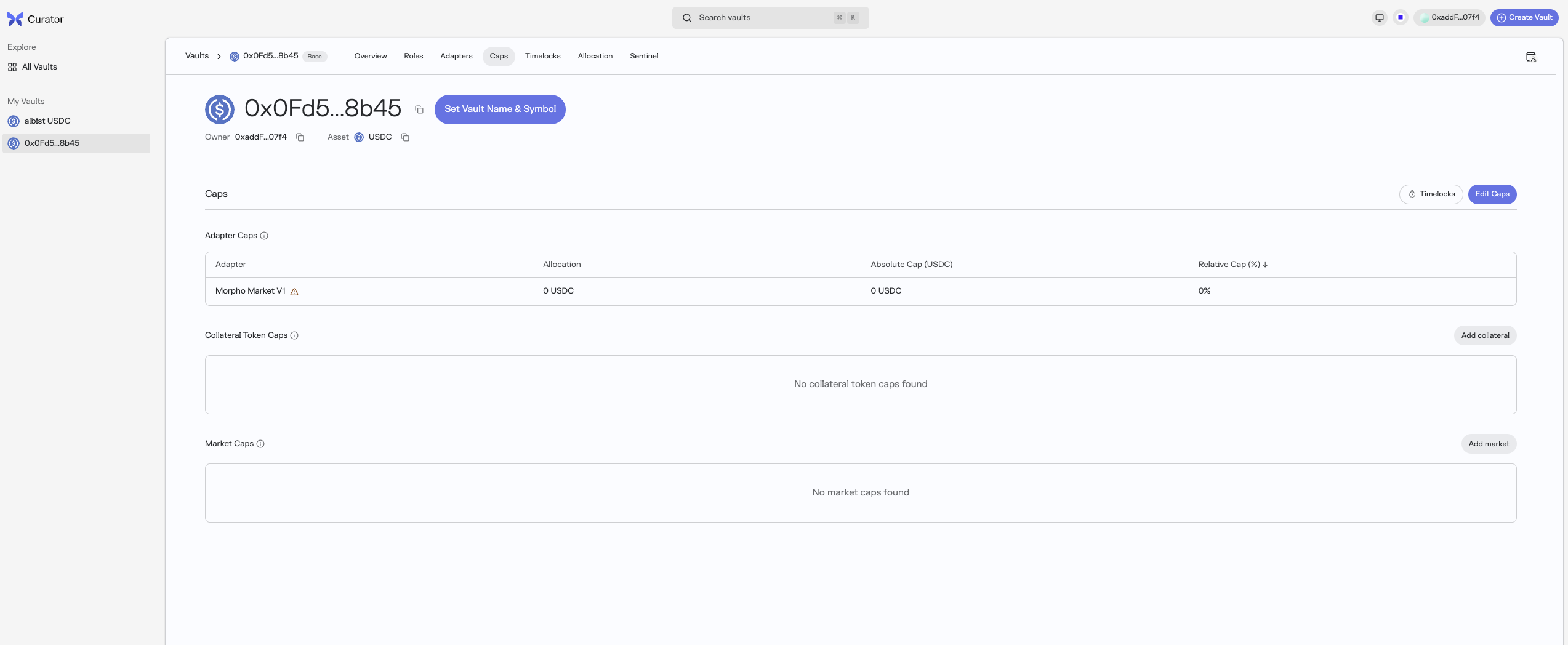
Note that for all caps, the process happens in 2 steps:
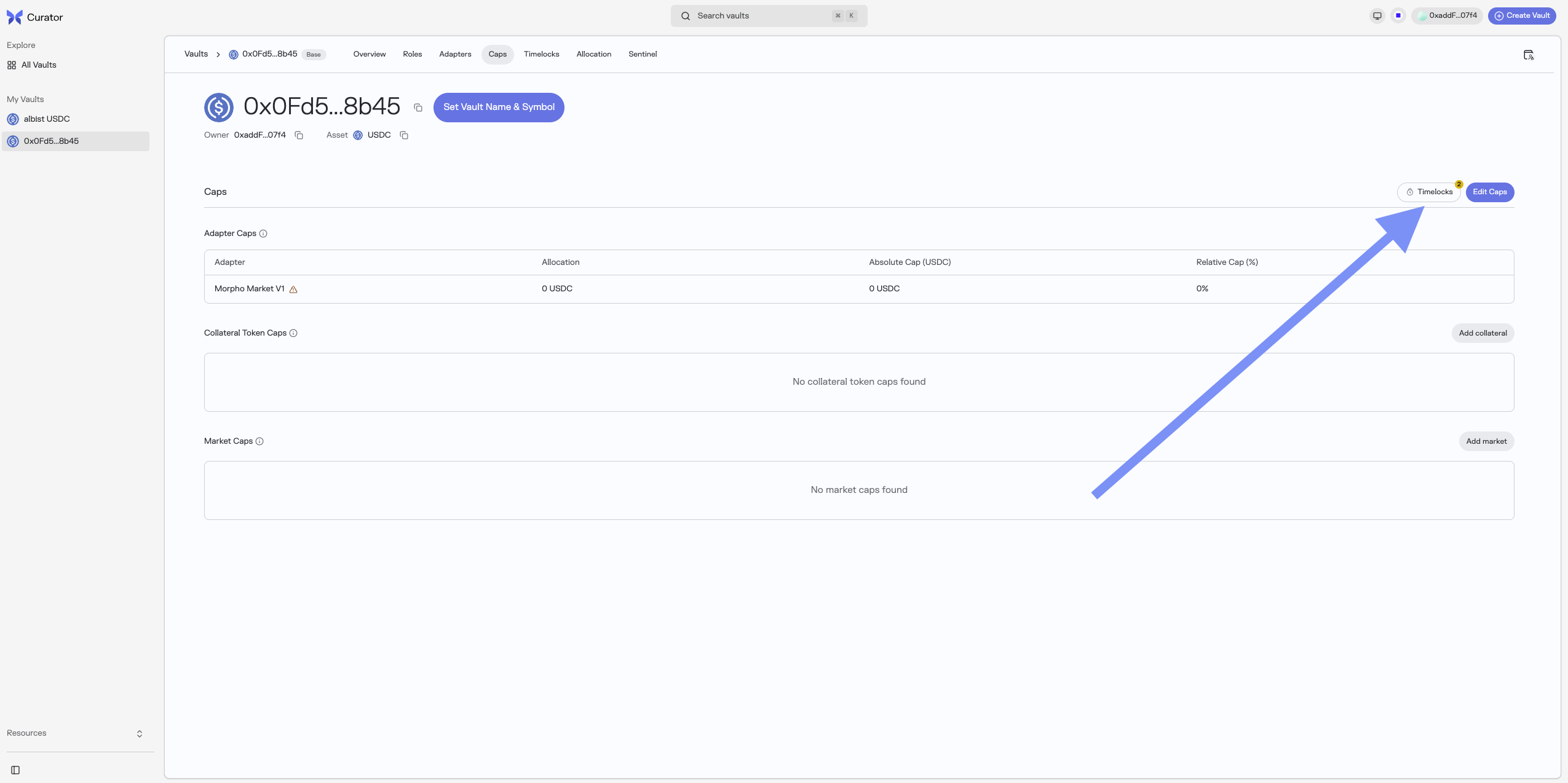
- First, you submit the caps
- Then, once timelock has passed (if any), click on the "Timelocks" button to accept the Caps.
Tip: you can first submit all the caps, and then batch accept all the Caps at once with the "Timelocks" button.
Method 2: via Script
The deployment repository handles adapter setup automatically: https://github.com/morpho-org/vault-v2-deployment
For adding adapters after deployment:
script/AddAdapter.s.sol
pragma solidity 0.8.28;
import {Script, console} from "forge-std/Script.sol";
import {IVaultV2} from "vault-v2/interfaces/IVaultV2.sol";
import {IMorphoMarketV1AdapterV2Factory} from "vault-v2/adapters/interfaces/IMorphoMarketV1AdapterV2Factory.sol";
contract AddAdapter is Script {
function run() external {
address vaultAddress = vm.envAddress("VAULT_V2_ADDRESS");
address factoryAddress = vm.envAddress("MORPHO_MARKET_V1_ADAPTER_V2_FACTORY");
IVaultV2 vault = IVaultV2(vaultAddress);
vm.startBroadcast();
// Deploy new adapter via factory
address newAdapter = IMorphoMarketV1AdapterV2Factory(factoryAddress)
.createMorphoMarketV1AdapterV2(vaultAddress);
// Submit enablement proposal
bytes memory enableData = abi.encodeCall(IVaultV2.addAdapter, (newAdapter));
vault.submit(enableData);
// Submit cap increases
bytes memory idData = abi.encode("this", newAdapter);
vault.submit(abi.encodeCall(IVaultV2.increaseAbsoluteCap, (idData, type(uint128).max)));
vault.submit(abi.encodeCall(IVaultV2.increaseRelativeCap, (idData, 1e18)));
vm.stopBroadcast();
console.log("Adapter deployed at:", newAdapter);
console.log("Proposals submitted. Execute after timelock.");
}
}Method 3: via Etherscan
1. Deploy the Adapter
Deploy MorphoMarketV1AdapterV2 via its factory by calling:
factory.createMorphoMarketV1AdapterV2(vaultV2Address)where factory is the deployed MorphoMarketV1AdapterV2Factory contract.
2. Enable the Adapter
- As Curator, encode:
abi.encodeCall(IVaultV2.addAdapter, (adapterAddress)). - Call
submit(bytes)with the encoded data. - After timelock, call
addAdapter(adapterAddress).
3. Set Risk Caps
The adapter's ID is computed as:
bytes memory idData = abi.encode("this", adapterAddress);
bytes32 id = keccak256(idData);Submit and execute cap increases:
increaseAbsoluteCap(idData, capAmount)increaseRelativeCap(idData, relativeCapWad)(where 1e18 = 100%)
4. Set as Liquidity Adapter (if needed)
As Allocator, call with the default MarketParams encoded as data. The encoded market params identify which Morpho V1 market will receive new user deposits and serve withdrawals:
bytes memory liquidityData = abi.encode(marketParams);
vault.setLiquidityAdapterAndData(adapterAddress, liquidityData);Allocating to Morpho Markets V1
Once enabled, allocate to specific markets by encoding the market parameters:
// Prepare market parameters
MarketParams memory marketParams = MarketParams({
loanToken: loanTokenAddress,
collateralToken: collateralTokenAddress,
oracle: oracleAddress,
irm: irmAddress,
lltv: lltv
});
// Allocate as Allocator
bytes memory data = abi.encode(marketParams);
vault.allocate(morphoMarketV1AdapterV2, data, amount);Optional: Adding a MorphoVaultV1Adapter
A MorphoVaultV1Adapter can be added in addition to connect your Morpho Vault V2 to an existing Morpho Vault V1.
Method 1: via the Curator App V2 (Recommended)
On your Morpho Vault V2 page, click on the Adapters tab. If none setup yet, the interface will propose a flow to set an adapter.
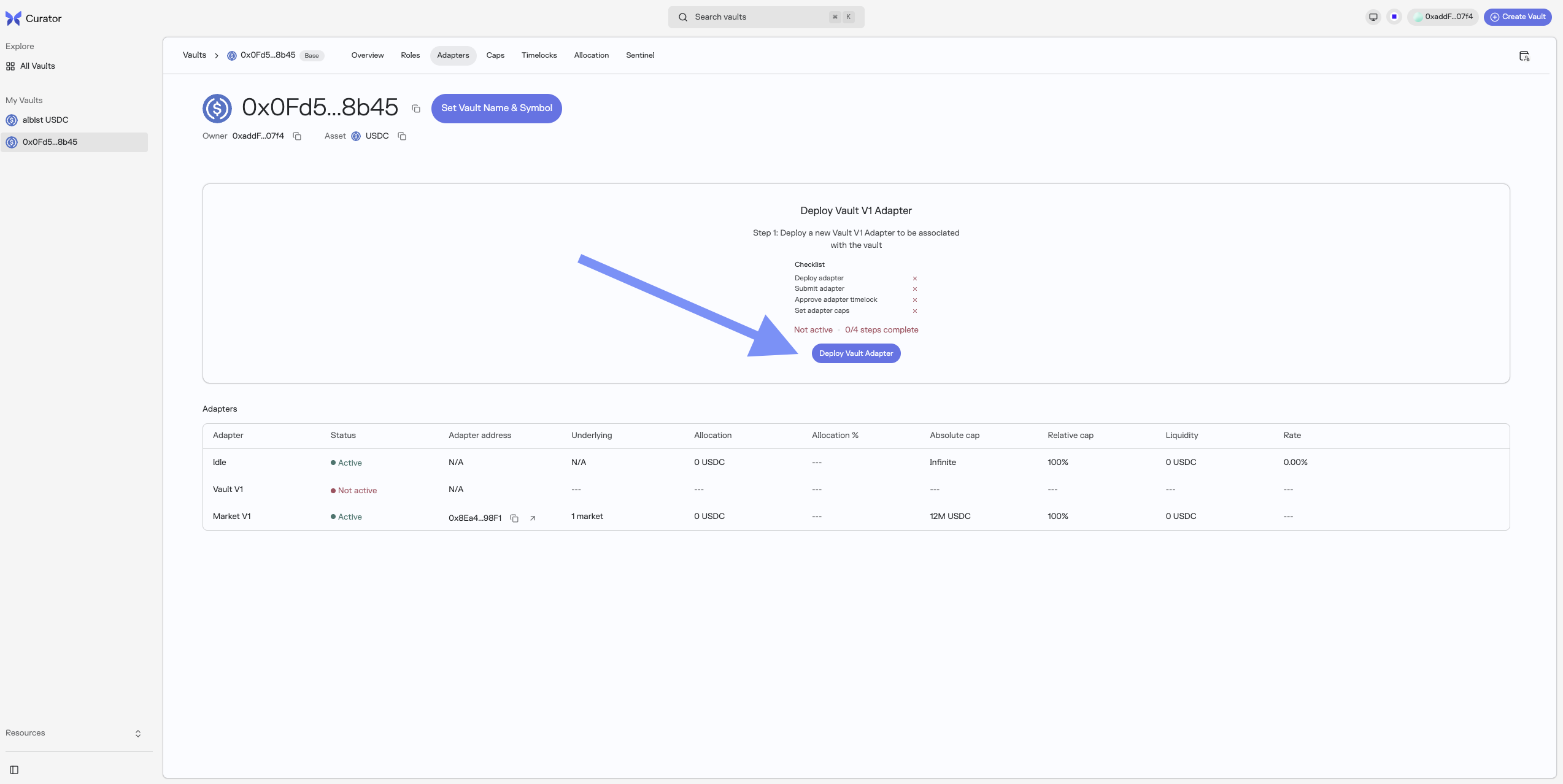
You will then be able to:
- Deploy the Adapter
- Set the Adapter (two steps submit/approve timelocked operation) on the Adapters page
- Set the Adapter caps (two steps submit/approve timelocked operation) on the Caps page
Method 2: via Script
The DeployVaultV2.s.sol script in the deployment repository includes automatic setup:
// Deploy MorphoVaultV1Adapter
address morphoVaultV1Adapter = address(new MorphoVaultV1Adapter(address(vaultV2), address(vaultV1)));
// --- Step 1: Submit proposals (run immediately) ---
bytes memory idData = abi.encode("this", morphoVaultV1Adapter);
vaultV2.submit(abi.encodeCall(vaultV2.addAdapter, (morphoVaultV1Adapter)));
vaultV2.submit(abi.encodeCall(vaultV2.increaseAbsoluteCap, (idData, type(uint128).max)));
vaultV2.submit(abi.encodeCall(vaultV2.increaseRelativeCap, (idData, 1e18)));
// --- Step 2: Execute after the vault's timelock has elapsed (run in a separate transaction) ---
vaultV2.addAdapter(morphoVaultV1Adapter);
vaultV2.increaseAbsoluteCap(idData, type(uint128).max);
vaultV2.increaseRelativeCap(idData, 1e18);
// Set as liquidity adapter (no timelock required)
vaultV2.setLiquidityAdapterAndData(morphoVaultV1Adapter, bytes(""));To add it manually after deployment, follow the same steps as above (deploy with _parentVault and _morphoVaultV1 constructor params, then enable and set caps via the timelock flow).
Managing Adapter Caps
Method 1: via the Curator App V2 (Recommended)
Directly on the Caps page of your Morpho Vault V2 by clicking on the "Edit Caps" button.
Method 2: via Script
Each adapter has associated IDs for risk management:
- MorphoMarketV1AdapterV2: Three IDs:
- Adapter ID:
keccak256(abi.encode("this", adapterAddress)) - Collateral ID:
keccak256(abi.encode("collateralToken", collateralAddress)) - Market ID:
keccak256(abi.encode("this/marketParams", address(this), marketParams))- whereaddress(this)is the deployed adapter address
- Adapter ID:
- MorphoVaultV1Adapter: Single ID based on
keccak256(abi.encode("this", adapterAddress))
Sentinels can decrease caps immediately:
vault.decreaseAbsoluteCap(idData, newLowerCap);
vault.decreaseRelativeCap(idData, newLowerRelativeCap);Delisting an Adapter
Before delisting, follow the full Adapter Soft Deprecation procedure, which covers both deallocating existing funds and zeroing caps to prevent frontrunning.
Setting Force Deallocate Penalty
To enable emergency withdrawals with a penalty:
// As Curator, submit proposal (max 2% = 0.02e18)
vault.submit(abi.encodeCall(IVaultV2.setForceDeallocatePenalty, (adapterAddress, 0.01e18)));
// After timelock
vault.setForceDeallocatePenalty(adapterAddress, 0.01e18); // 1% penalty