

(De)List Markets (in MorphoMarketV1AdapterV2)
Once your MorphoMarketV1AdapterV2 is deployed and enabled, you can control which Morpho Variable Rate markets it may allocate to by setting per-market risk caps.
Listing a market means setting non-zero caps for it and allocating funds to it. Delisting means removing those caps and withdrawing all allocated funds.
Listing a Market
Method 1: via the Curator App V2 (Recommended)
On your Morpho Vault V2 page, open the Caps tab.
- Click "Add collateral" to set the two collateral token caps (absolute and relative), or skip if the collateral is already listed.
- Click "Add market" to set the two market caps (absolute and relative) for the specific market.
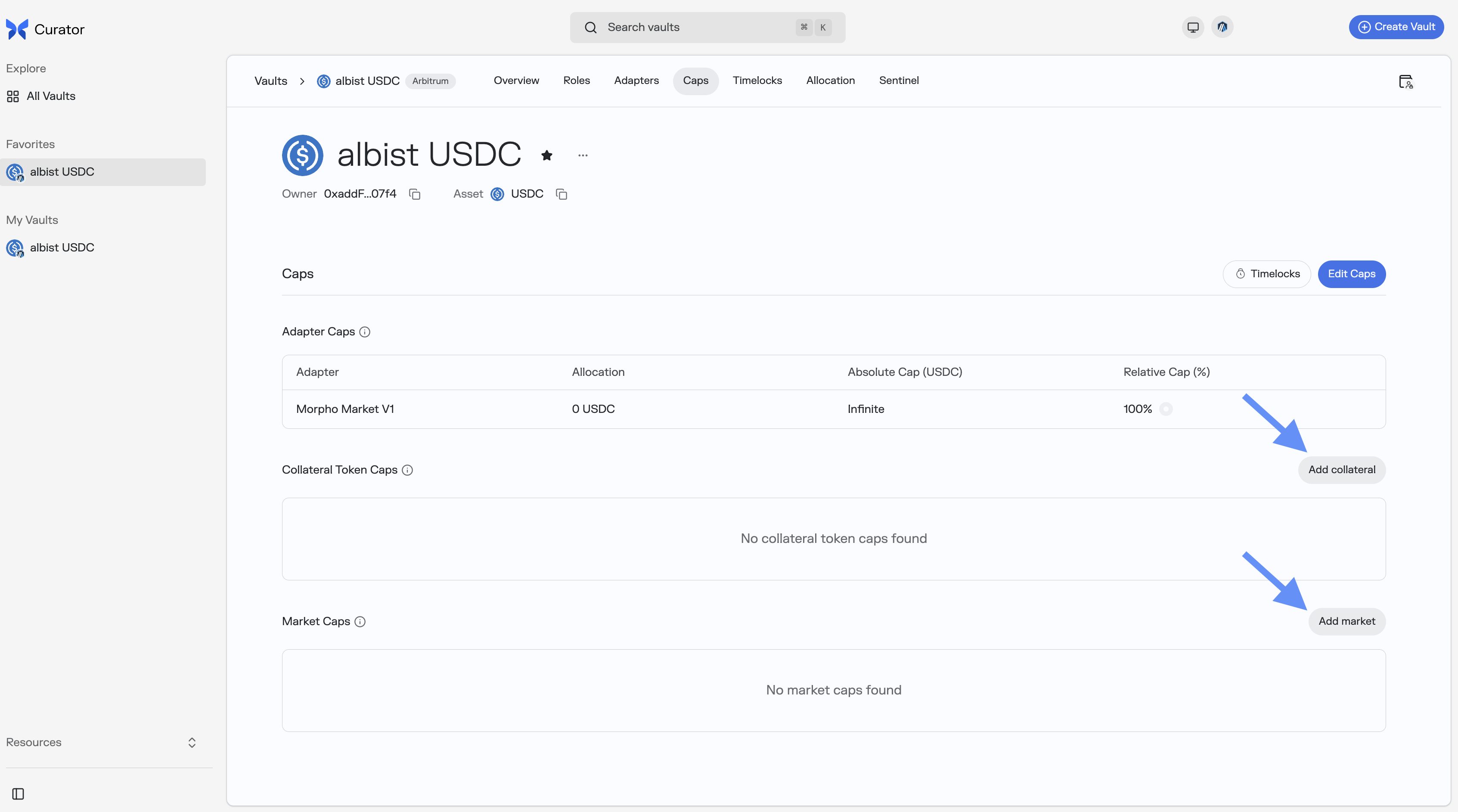
For each cap, the process is two steps:
- Submit the cap proposal.
- Once the timelock has elapsed, click "Timelocks" to accept it.
The market will be listed in the MorphoMarketV1AdapterV2 once you have allocated some assets.
Method 2: via Script
The snippet does the following:
- Computes the
idDataencoding for the collateral token cap and the market cap - Step 1: submits four timelocked cap proposals (absolute + relative for collateral, absolute + relative for market)
- Step 2 (separate transaction, after timelock): accepts all four cap proposals by calling the functions directly
The ID data encoding expected by MorphoMarketV1AdapterV2 for each cap level is:
| Cap level | idData encoding |
|---|---|
| Collateral token | abi.encode("collateralToken", collateralTokenAddress) |
| Market | abi.encode("this/marketParams", adapterAddress, marketParams) |
// idData for each cap level - passed directly to cap functions (hashed internally by the vault)
bytes memory collateralIdData = abi.encode("collateralToken", collateralToken);
bytes memory marketIdData = abi.encode("this/marketParams", adapterAddress, marketParams);
// --- Step 1: Submit proposals (run immediately) ---
vault.submit(abi.encodeCall(IVaultV2.increaseAbsoluteCap, (collateralIdData, type(uint128).max)));
vault.submit(abi.encodeCall(IVaultV2.increaseRelativeCap, (collateralIdData, 1e18)));
vault.submit(abi.encodeCall(IVaultV2.increaseAbsoluteCap, (marketIdData, absoluteCap)));
vault.submit(abi.encodeCall(IVaultV2.increaseRelativeCap, (marketIdData, relativeCap)));
// --- Step 2: Execute after the vault's timelock has elapsed (run in a separate transaction) ---
vault.increaseAbsoluteCap(collateralIdData, type(uint128).max);
vault.increaseRelativeCap(collateralIdData, 1e18);
vault.increaseAbsoluteCap(marketIdData, absoluteCap);
vault.increaseRelativeCap(marketIdData, relativeCap);Method 3: via Etherscan
1. Prepare the cap ID data
The idData bytes are passed directly to the cap functions (the vault hashes them internally):
bytes memory collateralIdData = abi.encode("collateralToken", collateralTokenAddress);
bytes memory marketIdData = abi.encode("this/marketParams", adapterAddress, marketParams);2. Submit collateral token caps
As Curator, call submit(bytes) on the vault with:
abi.encodeCall(IVaultV2.increaseAbsoluteCap, (collateralIdData, capAmount))abi.encodeCall(IVaultV2.increaseRelativeCap, (collateralIdData, relativeCapWad))(where1e18= 100%)
3. Submit market caps
Call submit(bytes) again with:
abi.encodeCall(IVaultV2.increaseAbsoluteCap, (marketIdData, capAmount))abi.encodeCall(IVaultV2.increaseRelativeCap, (marketIdData, relativeCapWad))(where1e18= 100%)
4. Accept after timelock
Once the timelock has elapsed, call the functions directly:
increaseAbsoluteCap(collateralIdData, capAmount)increaseRelativeCap(collateralIdData, relativeCapWad)(where1e18= 100%)increaseAbsoluteCap(marketIdData, capAmount)increaseRelativeCap(marketIdData, relativeCapWad)(where1e18= 100%)
Delisting a Market
A market is considered fully delisted when its caps are 0 and its allocation is 0. Both steps are independent: setting caps to zero is safe even while funds are still allocated (it just prevents new allocations), and you can deallocate at any time while caps are non-zero. The typical order is to cap first, then deallocate when liquidity allows.
Method 1: via the Curator App V2 (Recommended)
1. Reduce caps to zero
On the Caps tab, click "Edit Caps" and set both the absolute and relative caps for the market (and optionally the collateral token, if no other market uses it) to 0. Cap decreases are instant and do not require a timelock, they can also be done by a Sentinel.
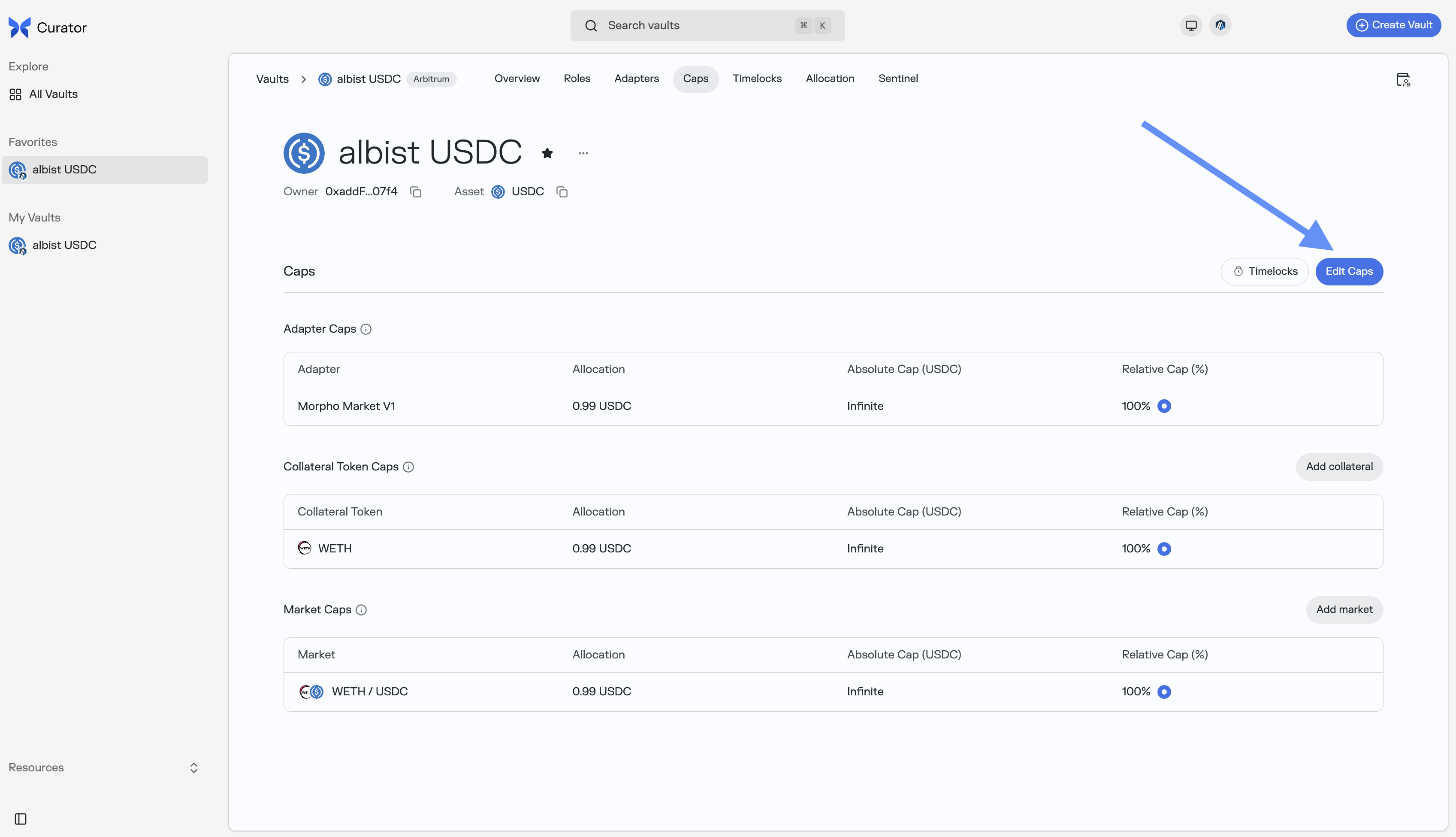
Set both the Absolute Cap and Relative Cap fields to 0 and confirm the transaction.

2. Deallocate funds from the market
On the Allocation tab, move all remaining assets out of the target market.
Method 2: via Script
The script does the following:
- Reads vault, adapter, and market parameters from environment variables
- Computes the
idDataencodings for the market cap and the collateral token cap - Step 1: immediately decreases both market caps to zero (no timelock, Sentinel can also do this); optionally also zeroes the collateral token caps if no other listed market shares the same collateral
- Step 2: reads the current allocation via
vault.allocation(keccak256(marketIdData))and deallocates if non-zero, the market must have available liquidity for this to succeed
script/DelistMarket.s.sol
pragma solidity 0.8.28;
import {Script, console} from "forge-std/Script.sol";
import {IVaultV2} from "vault-v2/interfaces/IVaultV2.sol";
import {MarketParams} from "morpho-blue/interfaces/IMorpho.sol";
contract DelistMarket is Script {
function run() external {
address vaultAddress = vm.envAddress("VAULT_V2_ADDRESS");
address adapterAddress = vm.envAddress("MORPHO_MARKET_V1_ADAPTER_V2");
address collateralToken = vm.envAddress("COLLATERAL_TOKEN");
MarketParams memory marketParams = MarketParams({
loanToken: vm.envAddress("LOAN_TOKEN"),
collateralToken: collateralToken,
oracle: vm.envAddress("ORACLE"),
irm: vm.envAddress("IRM"),
lltv: vm.envUint("LLTV")
});
IVaultV2 vault = IVaultV2(vaultAddress);
// marketData: raw encoding passed to allocate/deallocate calls on the adapter
// marketIdData: encoding used as the cap key (hashed internally by the vault)
bytes memory marketData = abi.encode(marketParams);
bytes memory marketIdData = abi.encode("this/marketParams", adapterAddress, marketParams);
bytes memory collateralIdData = abi.encode("collateralToken", collateralToken);
vm.startBroadcast();
// Step 1: decrease market caps to zero (instant, no timelock - Sentinel can also do this)
vault.decreaseAbsoluteCap(marketIdData, 0);
vault.decreaseRelativeCap(marketIdData, 0);
// Optional: clear collateral token caps only if no other listed market uses this collateral.
// Remove the two lines below if other markets share the same collateral asset.
vault.decreaseAbsoluteCap(collateralIdData, 0);
vault.decreaseRelativeCap(collateralIdData, 0);
// Step 2: deallocate remaining funds (requires available liquidity in the market)
// vault.allocation() is keyed on keccak256(marketIdData) - same encoding as the cap ID
uint256 allocated = vault.allocation(keccak256(marketIdData));
if (allocated > 0) {
vault.deallocate(adapterAddress, marketData, allocated);
}
vm.stopBroadcast();
console.log("Market delisted successfully.");
}
}Method 3: via Etherscan
1. Prepare the cap ID data
bytes memory marketIdData = abi.encode("this/marketParams", adapterAddress, marketParams);
bytes memory collateralIdData = abi.encode("collateralToken", collateralTokenAddress);2. Decrease market caps to zero
As Curator or Sentinel, call directly (no timelock required for decreases):
decreaseAbsoluteCap(marketIdData, 0)decreaseRelativeCap(marketIdData, 0)
3. (Optional) Decrease collateral token caps to zero
Only if no other listed market uses the same collateral asset:
decreaseAbsoluteCap(collateralIdData, 0)decreaseRelativeCap(collateralIdData, 0)
4. Deallocate remaining funds
As Allocator, call deallocate(adapterAddress, marketData, amount) where marketData = abi.encode(marketParams).
Allocating to a Listed Market
Once caps are accepted, the Allocator can direct funds to the market via the Curator App V2.
On your Morpho Vault V2 page, open the Allocation tab and click "Reallocate".
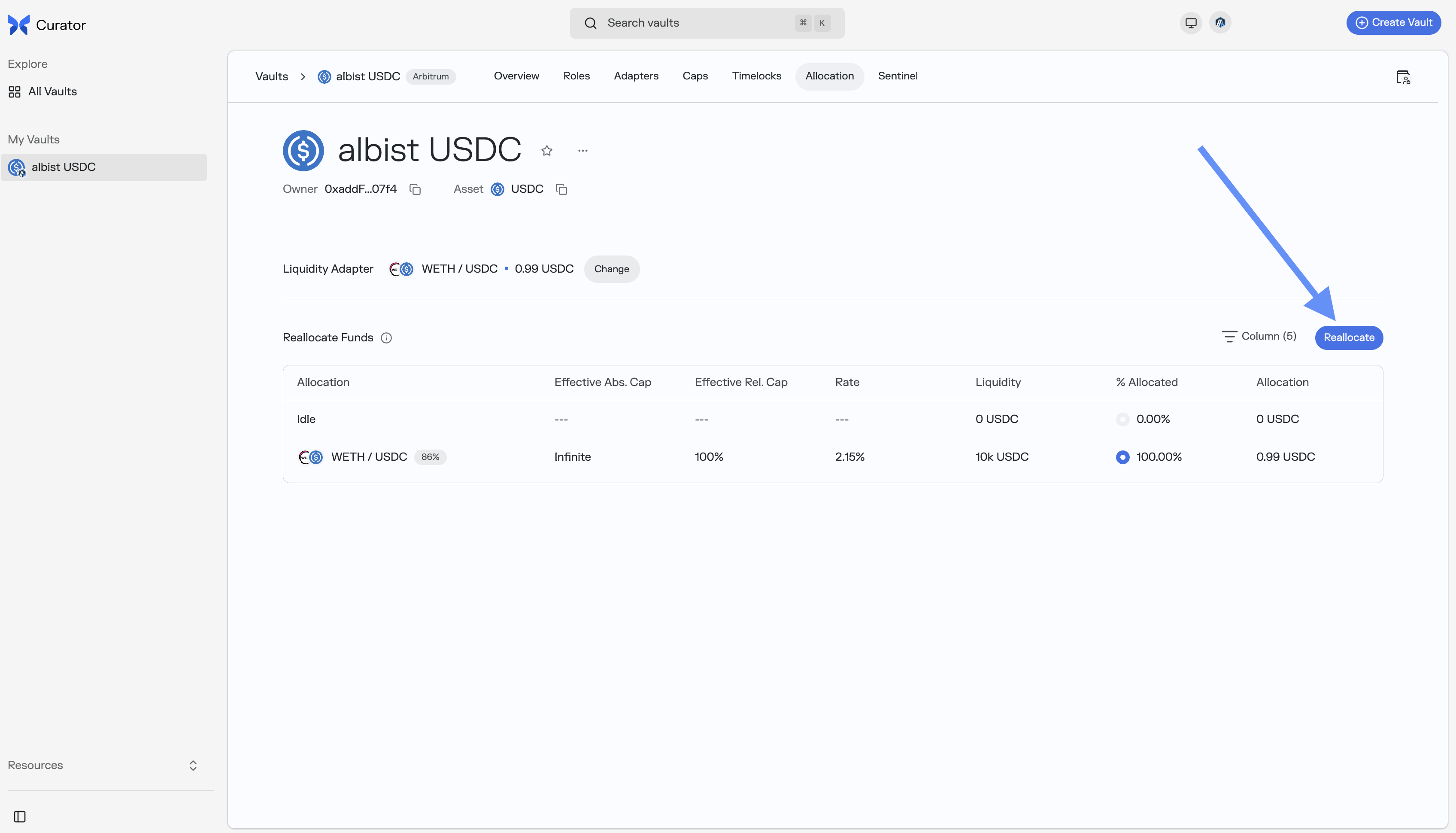
Enter the desired allocation amount for each market in the Allocation column, then click "Save" to confirm.
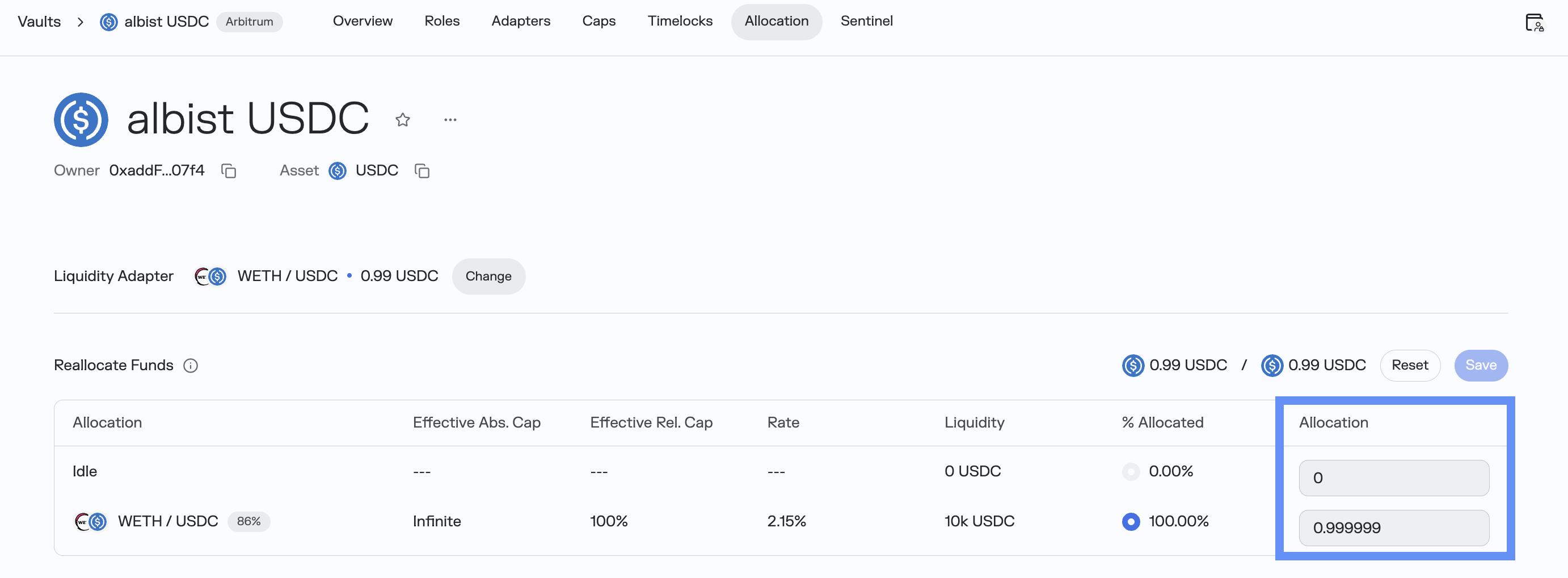
To set this market as the vault's liquidity source for user deposits and withdrawals, see Liquidity Curation.